Who is your best customer?

Your best customer is one who is always pointing out your weak points and your flaws and still trusts that you can solve their problems.

The importance of this type of feedback is a lot more important than satisfaction surveys that often provide valuable information, but not what you need most – the less satisfied and more disappointed. These people will not take the time to fill out a form or stop for a survey to help you fix your business. They moved.

In order to find out where they moved, and so it is likely that you have to collect some data about yourself. Start with these steps:

Identify them: Finding disenchanted customers is usually not that difficult, just ask your support. They know who they are and can even describe them (off the record) as “distressed” or “crazy.”

Contact them: When contacting them remember that these angry customers did not start that way. In the past each decided positively to buy your product or service, they believed in your company and in your offer. Only later they discovered a problem.

Acting: Failing with the customer almost always fall into one of three categories: The product was actually defective, the documentation was wrong, or customer expectations were not managed properly. Most departments of customer service really only knows how to deal with the first two. If, unfortunately, the customer with whom you failed is in the third category, you should identify where your marketing or sales presentation is failing, your client may be among the closest that can help you fix problems and avoid similar situations in the future.

What makes up the Help Desk?

The parts that are in the scope of this service are:

• Educate users on standard operating procedures and best practices for use of the features available in the tool;
• Make the implementation remotely of solutions on servers and client workstations;
• Provide under 24-hour channels of communication with the Service Desk analysis team;
• Provide insight to the client about the progress of the incidents through the tool, which also allows the classification of completed incidents;
• Supporting the client in problem diagnosis and corrective routing solutions, with a full operation view  of the tool;
• Provide information on features and mandatory minimum requirements of hardware through standard documents to support any purchases of servers, workstations and peripherals by customers;
• Forward any requests for analysis of product enhancements demanded by customers.

How fast does Customer Service need to respond?

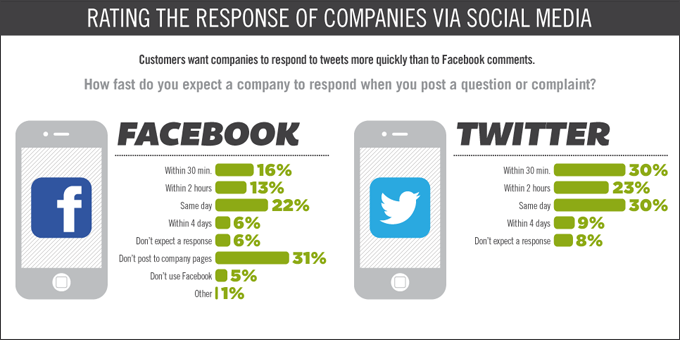
With the rise of social media and the transition to an information society, the instant response is already a rule. This is also true in the world of Customer Service, the expectation of consumers today is to have an Omnipresent Real-time Customer Service, which is Transparent, Authentic, and especially fast.

Users prefer the answer to be fast via social media, but what they prefer most is that their responses are rapid via Twitter! That’s 30% of users who want a quick answer, on average 30 minutes, compared with  Customer Service via Facebook that is only 16% with the same average time.

Be alert to the average time, the favorite is 30 minutes!

See the infographic below:

3 useful tips to improve your Service Desk´s result demonstrations

1) Preparation

Distribute documents in advance, online or offline, to everyone who will be attending the meeting to analyze the results.

2) Presentation

In presenting don’t narrate or read what is written on the slides, the information that is on the screen is complementary to their analysis.

3) Information and Knowledge

Put these various details about the operation of the service desk in a way that the customer understands. Make sure the information makes sense not only because you understand the data, but because you have experienced the problem and the result presented.

5 reasons why a service catalog is needed

1) The catalog will organize your IT environment and will allow you to analyze the shortcomings of each service offered

2) The IT services will stop receiving calls about other types of services such as maintenance of electro-portable office.

3) There will be no waste of time given the other demands beyond the IT Environment.

4) The service catalog includes all the services offered, software and business systems that can be installed and supported.

5) It will help the Service Desk team with information about policies and what needs to be done.

Technical support in the BYOD era

Until now IT was used to maintain the standardization of hardware, operating systems and programming languages  to reduce the maintenance cost, ease of hiring professionals, greater control over the documentation, methodologies used, ease of implementation processes contingency and business continuity. But the BYOD trend came strong and we need to review several of these concepts, especially because of the lack of standardization.

What we need to note:

– We will need to build a database of everything that sets a particular service and know which device you bought and used. Ex: the newly released versions of users’ devices is Motorola, iPhone, Samsung etcs…

– The support departments need to specify a service catalog.

– The Security Policy of the company must be respected. For this  reason, all devices must be registered and submitted to the Compliance Review.

– About the Privacy Policy, the company must monitor the use of particular devices, but without invading the private information of its staff.

– The Service Desk will need to clarify whether only act on what is owned by the company or whether it will provide unrestricted support for particular devices and why this or that support model was chosen. It is necessary to significantly increase the ability of self-service customers.

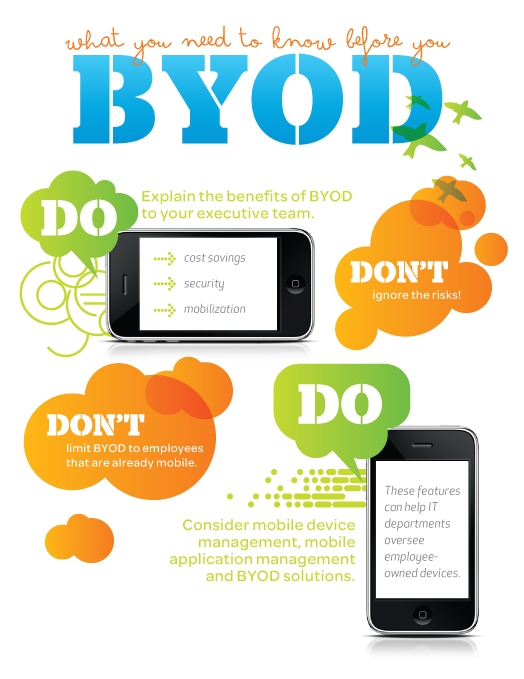
See the infographic below for some helpful advice on what to do and what not to do in the BYOD wave:

The 10 Commandments of the Help Desk

The best help desk professionals follow the 10 commandments created by Gustavo Gaidzinski. According to him, these are the basic premises for success in the industry.

Get to know the Ten Commandments for professional help desk:

1. Know your team: through involvement with HR and feedbacks.

2. Recognize your positioning: Make satisfaction surveys among users and talk formally with sponsors.

3. Taste the most bitter of medicines: discuss service processes and eliminate the comfort zone.

4. Choose the best soldiers: a good analyst is better than two average analysts, make the team get the hint.

5. Don’t frustrate the user: use fast, easy to maintain systems and keep an eye out to see if the user gets annoyed with the technology services.

6. Pick your battles: do not try to solve all problems at once.

7. Face your enemies put the execution of the priorities into practice and use the internal marketing as an ally.

8. Measure your success: indicators should be implemented to ensure continuous benefits.

9. Take care of your appearance: be careful with oral communication, voice quality, and fluency.

10. Commemorate your triumph: make some room in your  budget for celebrations, so keep staff engaged and in “high rotation”.

5 tips to renovate the role of your help desk

In the current IT environment, your help desk staff must take on more responsibility than ever. Here are some ways they can meet the new challenges and expand its reach.

Today, the entire industry is following the trend of virtualization, cloud computing and mobility. And the IT help desk is now being called to ease problems and maintain productivity with faster responses than ever. Below are five tips that will expand the role of the help desk and help your business.

1: Quick Solutions

The IT help desk works hard every day to manage and process hundreds of work orders from end users and customers. To reduce the number of calls to the help desk, end users should be provided with a set of common solutions, where they can easily be referenced. A simple problem should not get in the way of variety of other more strategic issues that your help desk has to face, and giving customers access to answers to help solve problems on their own saves everyone’s time.

2: Update

One of the most essential tasks is keeping PC, laptops and other devices up to date with the latest versions. All upgrades and migrations must be made quickly, without errors and with the data intact from device to device. Thus, productivity levels remain unchanged and requests to the help desk are kept to a minimum. By being prepared with the implementation of new initiatives, such as the migration to a new operating system, the entire IT infrastructure benefits from the upgrades without losing pace.

3: Security

It may seem obvious, but with technological advances comes risk. To avert a IT disaster , help desk technicians have to have a system that will prevent major damage to infrastructure. All  safety devices and maintenance are an essential responsibility of IT. The help desk must track all devices and update security patches.

4: Communication

Not many professionals have the opportunity to be in constant contact with customers. The help desk, however, is in daily contact with the end users that have a lot to say about the service being provided. Feedback is essential to improve customer service and increase productivity. Use this opportunity to ask for feedback through surveys, reports and service tracking. This feedback leads to improvements and success. When users are satisfied with their experience at the help desk, IT walks with higher harmony and fidelity.

5: Help!

The help desk technicians are worker bees of IT, responsible for solving all kinds of problems they encounter. To save time and increase efficiency, the help desk is always looking for ways to increase productivity. More technicians are turning to their tablets and other mobile devices connected to the Internet to use as virtual workspaces, giving them the freedom to access and manage work orders from anywhere and at anytime. The benefits of immediate help desk access increases productivity, and the end user has a shorter waiting time.

Tip of the Day: Classification of support tickets

Your tickets can have a come from any angle, from a simple question to a complex problem. Your customers may ask about a particular product feature, or may have questions about sales.

It’s important that your tickets are all sorted so they can be routed to the correct department.

This would easily generate reports showing which areas of your business are generating the greatest numbers of tickets (and therefore in need of greater attention).

10 Questions to Interview a Future Support Professional

Providing support with excellence can differentiate you from the competition. With that in mind, you need to assemble a team of customer support with genuine and essential skills to solve customer problems and also to represent your company on a day-to-day basis in the best way possible. The discovery begins with the person who is being interviewed, to see if they are passionate in helping other people, family, friends and even the dedication they give to their hobbies. Notice how they express themselves when speaking of these matters.

Below are 10 interview questions that can help you discover these new talents:

1) Throughout our selection process, with whom you’ve talked to and what have you talked about? (It shows if the person is attentive and pays attention to details)

2) Tell me about your last job – what did you love about it and what did you not like?

3) Tell me about problems with products or services that you already gave support to.

4) What are you an expert in? (And then ask him to tell you a difficult problem in which he used this skill)

5) How do you react when you do not know the answer to a question?

6) What do you do when the client says that you’re taking too long to solve the problem?

7) The customer pointed out a serious error / problem with the product, what do you do? (With this question you can evaluate the ability to empathize and apologize)

Tell me when you reversed the dissatisfaction of a customer with happiness.

9) What life experiences you’ve had, that are great examples?

10) Have you tested our service and what you know about that?

Now you have a base to find that great customer support professional that your team needs.