Tips for an Help Desk professional

1. Everyone is a customer

Everyone who calls you for technical help is your customer.

2. Be courteous

You are representing your entire company (and especially the IT training department), when you talk to your customers. Politeness

Polite: always. Treat each call with politeness, even if they do not return the courtesy.
3. Be clear and precise

Avoid technical terms. Your client does not have as much technical experience as you. Do not assume that your partner knows what you ask him to do, then remember to clearly describe each step he will have to follow.


4. Use analogies

Whenever possible, using every day analogies. It will help your client feel confident and put the issue in a technical perspective.


5. Be nice

Your client is probably frustrated. He’s probably in a hurry and thinking about how much he is losing in productivity by not knowing how to use his computer better. Listen openly, without judgment, to the customer’s problem, even if you’ve heard the description a hundred times before, this is the first time for your customer.


6. Be professional

Recognizing the frustration of your client, but a balance, don’t get emotionally involved. If your client remains in wrong path and describes their feelings, ask kindly, for more specific questions as possible to help bring the conversation back and fix it.


7. Keep notes

Create a database of knowledge. Accompany each incident, symptoms, causes and solutions.

You will begin to see patterns in how the software behaves, and you’ll soon be able to apply the intuitive patterns to solve new problems.


8. Train your colleagues – Share ideas.

Train your coworkers. When you learn a new faster solution to a problem, tell the other experts on the subject. If you share, they will share. Then you’ll all be better at it.


Good Practices for Help Desk Team Management

Managing a help desk is an important function in many different types of organizations. In order to participate in an effective help desk management, managers should lead by example when it comes to good communication, generating respect, and making sure that all the help desk staff are properly trained and up-to -date in terms of information and procedures.

One of the first things to keep in mind with the help desk management is the need to promote effective communication at all levels. This means that managers and staff must be able to communicate clearly, which helps minimize the potential for misunderstandings that can compromise and have a negative impact.

Along with solid internal communications, help the team create skills that make it easier to communicate with customers. This means active personnel training, not only in terms of the type of information, but also how to transmit this information using terms that customers can understand. The end result is a client who feels heard, an element that can go a long way to defuse a negative situation and maintain positive relationship with the client.

One should also take time to do performance reviews with staff. This is a time for the manager and staff to identify strengths and areas that need improvement, which in turn helps make the most effective help desk. The focus of the assessments is not just about the skill set of the team, but also an opportunity for them to make suggestions on how to improve help desk functions. Where the team should always be free to suggest new ideas for managers, incorporating this opportunity at the end of the evaluation can often yield some effective ideas and also strengthen the team.

Supporting the staff is also an important aspect of managing help desk. Everyone should feel confident that the manager will be there to assist in case something happens and it is beyond the scope. This leaves the team with confidence in the ability of the manager to support them.

Recognition of the value of all help desk staff, making sure everyone is up-to-date on policies and procedures, and be prepared to help employees with difficult situations, the process of managing help desk will proceed smoothly, benefiting all involved.

5 Tips to motivate the Help Desk team

1. Invest in training

One of the biggest reasons behind the poor performance of the team is the inadequate training. When employees don’t know the answers to the questions that costumers ask, the employee become stressed and their performance goes downhill. Train your staff extensively in technical assistance so they can handle any customer.

2. Provide appropriate tools

The team needs to be supported by cutting edge software. Systems that manage customer emails, knowledge base systems that allow its client’s help desk to direct resources online, self-service and chat systems are some of the tools that have a great impact on the quality of their service.

3. Trust your helpdesk

Your helpdesk will not be motivated to give their best, if you do not trust your professional judgment and let it make the final decision on customer service issues. You can show your confidence by getting rid of scripts that end up angering customers and agents without solving the real problems.

4. Provide sufficient incentives

Even well trained staff may lose interest in work if their successes are not recognized. The easiest way to recognize their efforts is to say thank you for their work, demonstrating that from a lunch to flexible terms.

5. Rewarding publicly and privately pointing errors.

While publicly reward your high achievers is one of the best ways to motivate them, pointing out their mistakes in front of others can contribute to a toxic work environment. Meet with employees who erred in private, point out their mistakes and do what you can to ensure that it doesn’t happen again. Most people would get the message and those who continue to offend are not fit for your organization anyway.

Tips to assemble a winning team

According to the team leader of Care.com, Nathan Brown, Regardless of the business sector, the main tips are:

1. Do not hire out of desperation

2. Never ignore a red flag

3. Adjusting personality issues

4. Skill sets are sometimes less important

5. Involve leaders in the hiring process

6. Interview all internal professionals interested in the opportunity before an external supply.

7. Focus on finding professionals with a passion for the mission.

Nathan sees it as something negative someone to say that they were the right person to perform all the tasks of the job. In this scenario there’s a lesson, If candidates are not looking for growth and challenge, then they probably do not have the motivation.

5 Tips to build a positive image of the IT staff

1) Start with the Support

“Support is responsible for the first impression on IT and therefore represents the first point to be changed so that the reputation of the area to become different,” according to analyst research management and technology consulting Info-Tech Research Group, Jennifer Perrier-Knox.

2) Explain what was done wrong so it won’t be repeated

“When the IT department is called is because the requester really is in trouble and, of course, and solve them, wondering what was done wrong and how to avoid them in the future,” says technology consultant for a health insurance carrier American, Julia Steltmann.

3) Avoid technical terms

For other departments, the ideal  IT professional is one that can explain a technical issue easily and that everyone understands. Staff from other areas do not have an obligation to know the specifics of the technology company.

4) Respect the time

Even with the extra demands of the business, the IT manager has the duty to organize the teams so they do not accumulate weeks between a request and service. Everyone knows that when a department requests the help of technology, they needs this support immediately and not nearly a month later.

5) Communicate forecasts

According to Jennifer, when requesting an IT project, she wants to know how long it takes until all the initiative is completed and what is slack. “Furthermore, it is important to have feedback (returns) over the project to know what’s going right, what we could do in the area requesting to expedite the work of IT staff, among others,” says Jennifer.

Help Desk and Social Media – Everything’s worth sharing!

Remember the days when you had to call the customer service department, waiting on the phone for 2 hours and then received no help from the customer service representative? Those days are disappearing fast and are almost entirely due to the help desk for social revolution, facilitating the process of satisfied customers constantly when your questions are answered. The customer service practices clearly have to adapt.

One of the premises of Social Media is: Everything is worth sharing! How Twitter, Facebook, LinkedIn and other social media platforms become more popular, customers are taking matters publicly about their problems with the companies. The fans like to get the inside scoop on your business, product or service. Give it to them! Users are becoming more selective about the brands that they connect with.

Create within the virtual environment practices to respond to tickets, one of the tips is to create a twitter #hashtags on an issue. Along with the short links directed to an explanatory page. Another practice is to create an album on facebook with humorous images and syntheses of small resolutions of FAQs. Also insert a link to a page explaining more.

Always open space for dialogue between service users and product. It is good practice and two-way street, help the client and helps improve your own service.

The pros and cons of adopting BYOD

By measuring the pros and cons of adopting BYOD, is that 66% of companies highlight worker productivity. On the negative side, 41% say that the trend affects the cost management for mobile devices, 36% reported increase in support and 33% consider an increase in help desk costs.

However, only half of the companies measures the specific impact achieved by BYOD separately from other types of business processes. Among the items examined, 60% measure the costs of software licensing, 53% evaluate the reimbursement for the devices of employees and 51% consider the cost of replacement devices.

But overall, a survey found 15% reduction in the cost of replacement devices and 12% increase in employee productivity among companies that adopt BYOD. Also, found 8% reduction in reimbursements for expenses of employee data and 5% fall in the cost of training and courses.

The study’s estimate is 7% growth in the cost of managing mobile devices, up 3% on the cost of security of business-critical data, 3% increase in spending on servers and 2% increase in spending for regulatory compliances.

“The lack of strategy in addressing the consumerization creates security risks, financial exposure and a management nightmare for IT,” concludes Armbruster (vice president of Trend Micro in Brazil.) For him to embrace the trend, there is a need “strategic approach, flexible policies, appropriate security and management tools. “

The help desk – video as a killer tool

Going beyond the idea of help desk through telephones is essential for efficiency and effectiveness. In the last decade, this process began with e-mail and portals. Remote desktop tools that take control of computers remotely expanded on that trend significantly and reduced considerably the displacement of technical desktops to handle many minor issues.

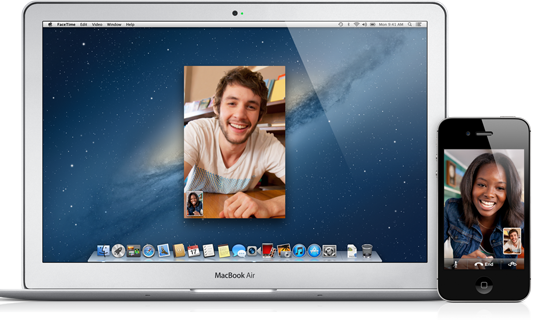
Then the video – either call or conference has proven to be effective in almost any business or academic niche. Through meetings that include participants spread across the globe, sales presentations and negotiating contracts with distant customers, and even diagnostic and treatment protocols for remote hospitals or staff. Why not bring these advantages to the corporate help desk and related services? The power of video as a support tool is evident, for example when using Apple’s FaceTime or Skype instead of a phone call.

5 big technology trends for 2013

1. Mobile Devices

Mobile phones will overtake PCs as the most common device for Web access worldwide.

Some IT departments need only support mobile devices for specific professional whose duties require mobility. The others remain in traditional computers. But the rise of mobile devices signals the end of Windows as a unique corporate platform.

“By 2015, shipments of tablets will reach around 50% of laptop shipments and Windows will probably be third on the preference of the people behind Android and iOS from Apple,” says David Cearley, a Gartner analyst. “As a result, participation in the Microsoft client platform (PC, tablet, smartphone) will probably be reduced to 60% and may fall to 50%.”

2. Personal cloud replaces the notion of personal computer

The cloud will house all aspects of a person’s life. For being a model as large and able to marshal infinite resources “any platform, technology or vendor will dominate it,” indicates the research institute. This also means that IT has to support almost everything.

3. Cloud computing

As cloud adoption grows, IT departments will have to create “cloud services” to serve as a focal point to manage access to external services.

4. Big Data strategy

Big Data projects are becoming more economical for businesses, thanks in part to the servers and low cost CPUs. Big Data strategies, Gartner analyst believes, will cause users to no longer run isolated projects. Companies will incorporate the analysis of massive data in more activities they perform.

5. Computing memory (in-memory)

In-memory computing, says Gartner analyst, can be transformational. It allows activities that consume hours to be performed in minutes or seconds. The in-memory computing will become a dominant platform in the next year or two, as more and more users search queries in real time.

5 radical resolutions for IT in 2013

The five resolutions that can help the work of the CIO and his team in the long term, and also tends to make the environment even more productive.

Resolution 1: Let employees use the computer that they want. Give users a predetermined budget and if they want a computer that goes beyond this amount, they can pay the difference. On the other hand, if they don’t reach the budget, use the rest of the money to invest in other items such as monitors.

Resolution 2: Let users use the smartphone that they want. As with computers, establish security standards and access to smartphones. Users who prefer their differentiated devices must manage them on their own. Give them a monthly spending limit, so they have to take care of contracts and/or penalties for excess usage and service problems.

Resolution 3: Migrate to online applications. Whenever possible, explore this type of solution, either through the internet or intranet. These applications are not tied to specific platforms; it allows the IT to stay worry free with manufacturers or platforms. Moreover, these applications require no maintenance and can be easily modified.

Resolution 4: Trace strategies for using VDI. Anyone who has a tablet knows what the future awaits: applications and environments that can exist in separate locations, but operating as and unified experience.

Being able to run different applications is just the beginning. The same principle applies to separate personal applications, enterprise applications, corporate data from personal data, encrypted data without encryption, and so on.

Resolution 5: Adoption of collaborative platforms. With people working in different places – in an office, at home, on the street or anywhere else – information that they share and exchange must be easily accessible. Email takes time to pass information from one person to another, so it’s not the best kind of collaboration.

The implementation of a collaborative platform will not only help improve the productivity and working style but also will help to better distribute the tasks.